
Running Angular SSR with Hono on Vercel


This post highlights some of my findings about Angular SSR while building BuilderKit’s landing page and application. If you are here looking for a step-by-step guide on how to set up Angular SSR, this is not it, but don’t worry, here’s a link for an Angular + Hono SSR starter if you need one: https://github.com/builderkit/angular-hono-ssr-starter
Disclaimer: Because I’m not a professional writer, this post has been proofread by ChatGPT to fix typos and grammar issues. It’s 100% written by me (a human being) and it showcases my journey of developing and releasing builderkit.dev as a 100% Server Side Rendered landing page and application. There is no AI-generated content in this blog post.
The Stack
builderkit.dev uses Angular 100% across the board. If there’s one thing I hate the most, it’s developers who don’t trust their own work. I’ve seen so many cases of developers selling tools for their chosen framework or library, only to build the entire marketing page using a completely different stack.
No. That’s not me. builderkit.dev is fully powered by Angular, and in fact, it uses the same exact Starter Kit it promotes.
For my SSR server, I chose Hono. I had used it before on a standalone backend project, liked the experience, and wanted to give it a chance. It does the job and to me that’s what matters most.
The Initial Problem
The first problem I ran into was broken static assets. I didn’t notice it until I ran my first ng build. Luckily, the issue was easy to solve. After some back and forth with a couple of console.logs and documentation, I managed to fix the problem like this:
import { serveStatic } from '@hono/node-server/serve-static';

// Serve static files
app.use('*', serveStatic({
  root: join('.', join(import.meta.dirname, '../browser').replace(process.cwd(), ''))
}));
The issue was that Hono’s Node server package didn’t support absolute paths. I had to provide a relative path using the workaround above. Thankfully, they added support for absolute paths, so we no longer have to worry about this. Now the code looks much simpler:
import { serveStatic } from '@hono/node-server/serve-static';

// Serve static files
app.use('*', serveStatic({
  root: join(import.meta.dirname, '../browser')
}));
Make sure you're using the latest version of @hono/node-server and this won’t be a problem anymore.
The Main Problem
As I approached the final days of the initial version’s development, I wanted to try pushing the project to Vercel to see how it would go. I set up Vercel by creating the api directory at the root of the project and placing the index.mjs file inside.
Normally, if you’re running the default Angular SSR setup (which uses Express), you would just do this inside the api/index.mjs file:
const { reqHandler } = await import("../dist/<YOUR_PROJECT_NAME>/server/server.mjs");

export default reqHandler;
Angular already provides an exported request handler called reqHandler located in src/server.ts. All you need to do is re-export it so Vercel can use it as the entry point to your server.
When using Hono, you have to do things a bit differently. Luckily, Hono supports all kinds of platforms which is one of the reasons I chose it. I ended up with the following in my api/index.mjs:
import { handle } from 'hono/vercel';

const { app } = await import('../dist/builderkit/server/server.mjs');
const handler = handle(app);

// Export the handler for all HTTP methods that Vercel uses
export const GET = handler;
export const POST = handler;
export const PATCH = handler;
export const PUT = handler;
export const OPTIONS = handler;
export const DELETE = handler;
For this to work, I exported the app from my app/server.ts file:
// Export the app instance for use in other modules such as tests,
// edge functions, or other server environments.
export { app };
I then created a vercel.json file at the root of the project with the following content:
{
  "$schema": "https://openapi.vercel.sh/vercel.json",
  "name": "builderkit",
  "rewrites": [
    {
      "source": "/(.*)",
      "destination": "/api"
    }
  ],
  "functions": {
    "api/index.mjs": {
      "includeFiles": "dist/builderkit/**"
    }
  }
}
This configuration redirects all incoming traffic to /api, allowing the Vercel function to take over and forward the request to your server.
You also have to tell Vercel which folder to include so it can find and bundle all the files with the function itself. Otherwise, it won’t know where to find your server, and your server needs all built files so we include everything.
I pushed the changes and, to my surprise, everything was working… or so I thought.
The Real Problem
When I looked at the source code of the Home page, I realized it wasn’t actually being rendered on the server. It was rendering on the client side.
After spending about half a day debugging, I finally realized the index.csr.html file from the dist/builderkit/browser folder was being picked up by Vercel as the statically rendered home page. It was being served directly without hitting my server or the Vercel function at all.
This file (alongside index.server.html) had been renamed (with some backlash) recently to avoid this exact issue but apparently, that wasn’t enough to stop Vercel.
I tried a couple of things before I realized this wasn’t something I could fix myself. It had to be a bug, so I moved on.
The Solution
I finished the website, pushed everything to Vercel, and did a soft launch even though the home page was client-rendered. Then I got back to work.
The first thing I did was create an issue on the Angular CLI repo: https://github.com/angular/angular-cli/issues/30736
I won’t go into too much detail, but apparently index.csr.html is inlined with the server build, and you can safely remove it if you’re not using service workers.
Since I wasn’t using one, I added a postbuild script to remove the file after the build process:
import fs from 'node:fs/promises';
import path from 'node:path';
import { fileURLToPath } from 'node:url';

// resolve __dirname in ESM
const __filename = fileURLToPath(import.meta.url);
const __dirname = path.dirname(__filename);

const distDir = path.resolve(__dirname, '../../dist/builderkit/browser');
const csrFile = path.join(distDir, 'index.csr.html');

try {
  await fs.unlink(csrFile);
  console.log('✔ index.csr.html removed');
} catch (err) {
  if (err.code === 'ENOENT') {
    console.log('ℹ index.csr.html not found, skipping');
  } else {
    console.error('✖ Error removing index.csr.html:', err);
    process.exit(1);
  }
}
I placed this inside scripts/postbuild.mjs at the root of the project and added it to the package.json scripts:
"postbuild": "node ./scripts/postbuild.mjs"And voilà!
With the absence of index.csr.html, Vercel was able to route the Home page traffic to my server through its function, and everything was finally rendered correctly on the server.
Be careful!
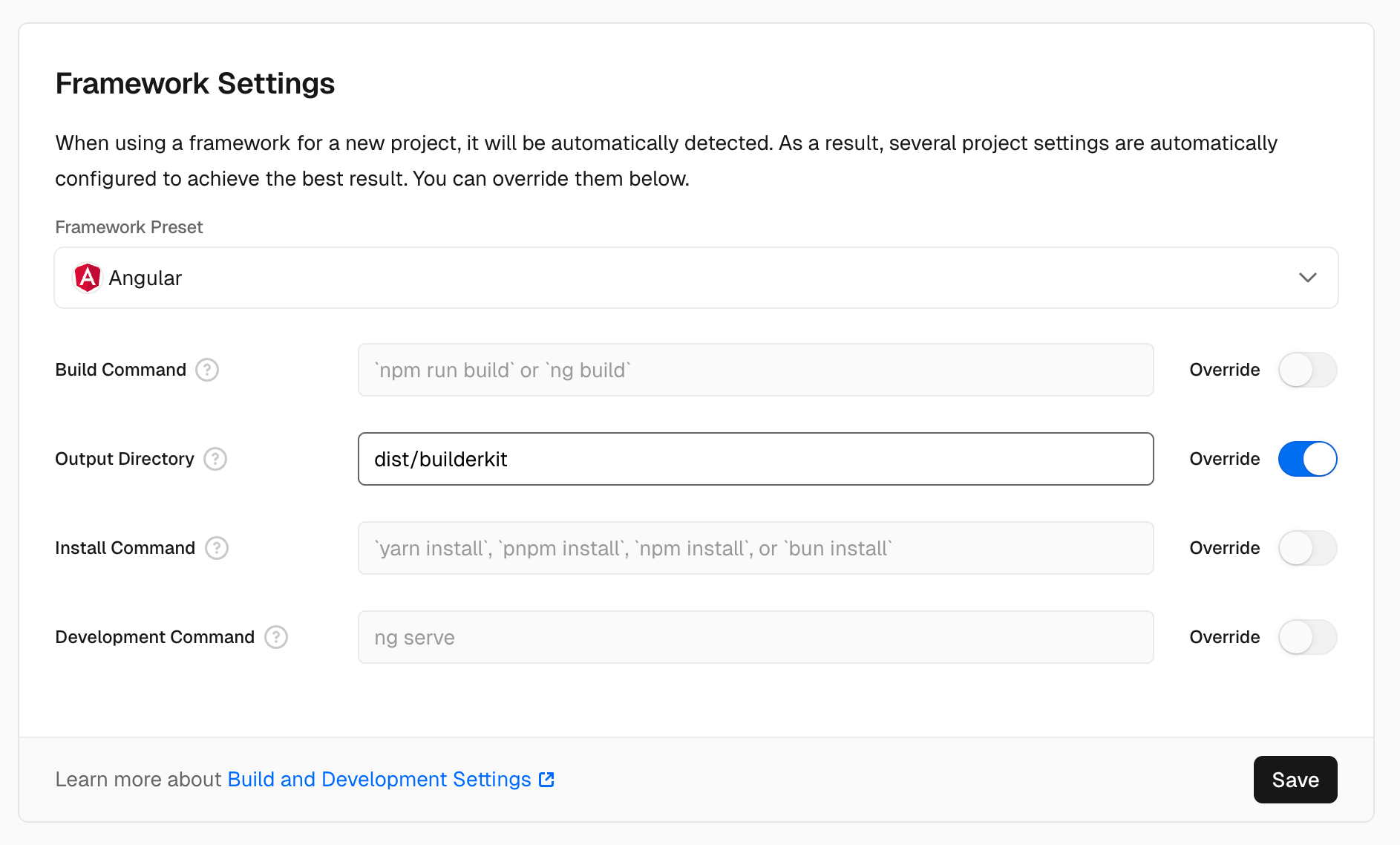
I mentioned that I tried a couple of things and one of them was changing the output directory from Vercel’s project settings:
The default value for the Output Directory is dist, and Vercel’s builder understands the output structure of Angular. It correctly places everything inside the dist/<YOUR_PROJECT_NAME>/browser folder as the primary output, so it can serve static assets from the Edge cache:
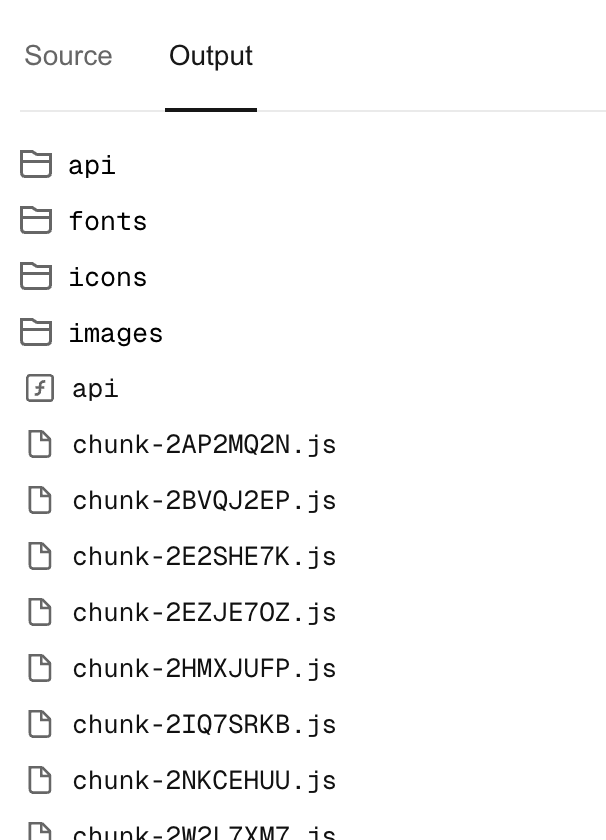
Since the contents of dist/<YOUR_PROJECT_NAME>/server are assumed to be bundled with the api function and aren’t required to be served to the browser, Vercel’s builder ignores them.
By changing the Output Directory, I was able to override this automated process. As a result, the contents of the browser folder including index.csr.html, didn’t end up directly inside Vercel’s output. Instead, the contents of dist/builderkit ended up like this:
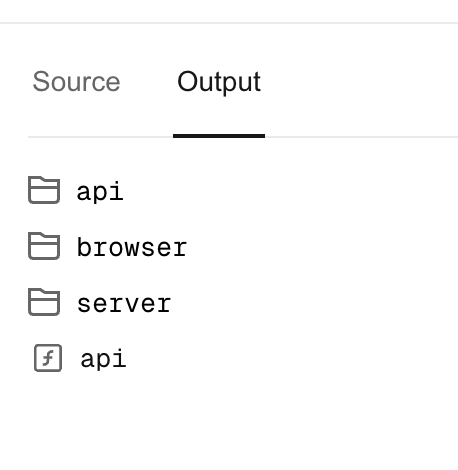
When I reloaded builderkit.dev and checked the source, I saw it was now correctly being rendered on the server.
But...
This wasn’t because I fixed the underlying problem. It was because I unintentionally caused Vercel to leave the entirety of the static assets inside the browser folder. And now, since there were no static assets directly inside Vercel’s output directory, all traffic, including every single request to static assets like images, styles, and chunks, went through the SSR server.
There are two big issues with this:
1. Every single request goes through your server:
Because all requests including static assets are going through your server, you end up with a ton of incoming requests hitting it. If you're not careful or mindful about your code order, this could easily trigger your server-side middleware functions on every single request.
And if you’re using third-party services and initializing them within those middleware functions such as Supabase, Firebase, or anything like that, your server could end up making a huge number of unnecessary API calls to those services.
2. Vercel function calls:
BuilderKit’s homepage makes about 110 requests to load everything; CSS styles, images, chunks, etc. And that’s not even close to what some larger websites do. With this mistake, you could end up triggering your Vercel function 110 times just to load the homepage for a single user.
You probably already know where this is going.
If you're not careful, these issues could easily lead to massive costs and we’re talking hundreds of thousands of dollars. And even if you're being cautious and mindful about spending, you’re still serving everything from a function. That means no Edge caching, significantly lower performance, and a very inefficient setup overall.
Conclusion
Angular SSR is in a much better place than it was a couple years ago, but it's still not something you can just set and forget especially when you’re deploying to platforms like Vercel. You need to understand how things are wired behind the scenes or you’ll run into weird bugs, hidden performance issues, or even surprise bills.
I’m sharing all of this so you don’t have to go through the same headaches I did. It’s not about blaming Angular or Vercel, it’s just the reality of building real things with real tools. There's always friction. But once you understand where the sharp edges are, you can build around them.
Hopefully, this post helps you avoid some of those sharp edges and gives you a clearer picture of what to look out for when going all-in on SSR with Angular in 2025.
Let me know if you found this useful, and feel free to reach out if you run into similar issues.